Showing posts with label 1st Grade. Show all posts

Wednesday, January 28, 2026

Big Keys, Big Dreams: Our First Day with Chromebooks in 1st Grade

There’s a special kind of magic in a first-grade classroom when we get to use the Chromebooks for the first time. This week, our budding tech experts officially launched their digital learning journey!

Introducing Chromebooks to six-year-olds can feel like a tall task, but our first graders handled it like absolute pros. Here’s a look at how we got started and the skills we’re already mastering.

🐝 Safety First: The 4 Bees

Before we even opened the lids, we talked about how to treat our new tools with "tender loving care." We are applying our school’s 4 Bees to the digital world to make sure everyone stays successful:

Be Kind: We use our words to build others up when working online.

Be Responsible: We carry our Chromebooks with two hands (the "hug" hold) and make sure they are plugged in to charge.

Be Respectful: We listen for the "Screens Down" signal and treat the hardware gently.

Be Safe: We only visit the apps and sites our teachers approve.

🚀 Logging In? It’s a Snap!

Forget the days of students struggling to remember complex strings of numbers and symbols. We used Clever Badges to sign in. Each student has a unique QR code on a card; they simply hold it up to the Chromebook camera, hear a "beep," and they are in!

The look of pure joy when the screen magically unlocks is definitely the highlight of the week.

🎨 Learning the Ropes with Seesaw

Once we were logged in, we headed straight to Seesaw, our digital portfolio app. Our first mission was a "Chromebook Scavenger Hunt" activity designed to build muscle memory.

Here is what we practiced:

Mastering the Trackpad: Using "point and click" to move items around the screen.

The Power of the Keyboard: We practiced finding letters to type our names as well as capitalizing our name.

Digital Artistry: Students used the drawing tool to create self-portraits.

Shape Shifting: This was the fan-favorite! We learned how to insert shapes, change their colors, and grab the corners to resize them from tiny dots to giant circles.

💡 Why This Matters

While it looks like play, these activities are foundational. Learning how to navigate a trackpad and manipulate digital objects builds the fine motor skills and digital literacy our students will use for the rest of their lives. Plus, seeing their work instantly uploaded to their digital portfolio gives them a huge sense of pride.

Wednesday, December 4, 2019

Project Based Learning in 1st Grade

Students in 1st grade at Fuller Meadow School participated in a Project Based Lesson in their Innovation class.  The Driving Question for our project is -

How can we as innovators reimagine  learning spaces in the Fuller Meadow Courtyard?


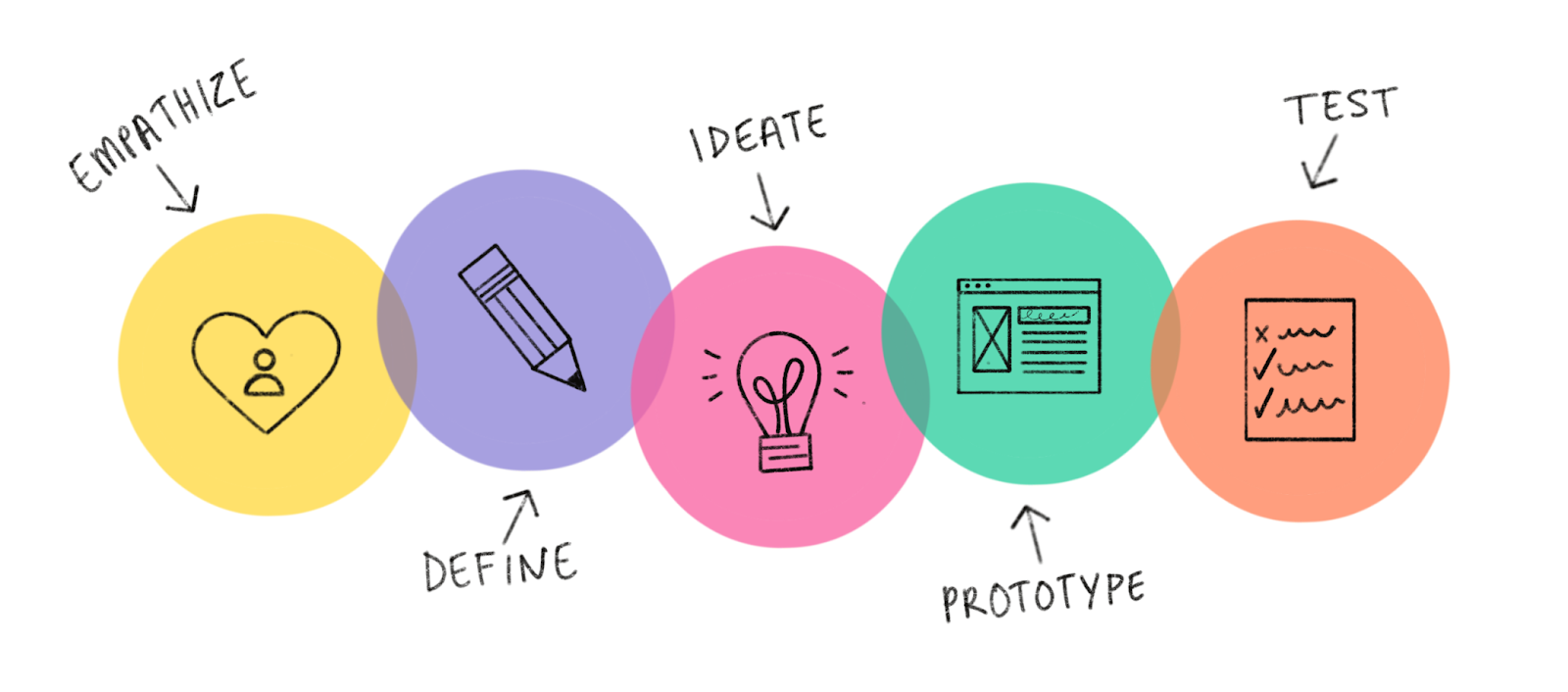
Design Thinking Process

Entry Event - 
Students and teachers had a discussion about innovators and innovation. We asked the students, "What makes someone an innovator?"  Then, we showed them this video to spark some ideas for innovation.  After the video, they began to make connections about how we can be innovators.


Next, we took the students out into the Fuller Meadow courtyard to find problems with learning in different areas. 


Students explored and investigated the Fuller Meadow courtyard for whole class learning, listening to nature, and finding something human made and something made in nature.  Click HERE for the drawing sheet.


Listing Problems in our Courtyard
Using their drawings from the previous day, students met with other students in the class to share what they found in the courtyard.  


We created a slideshow to ask the students to identify the problems in the different areas of the courtyard. Click HERE for the slideshow.

We then made a list of problems in each area.  Click HERE for the list.

Looking at our space
After more discussions about what innovators do, we explored our courtyard from several different angles.  Ms. Clemenzi gave each student a birds-eye view of our courtyard from Google Maps. Students labeled each area of our courtyard and shared how they would improve the areas.  Each class chose an area that they would like to reimagine.  Students were given a sheet to draw their ideas for changing the area. Click the links below to see the drawing sheet.


 Student generated questions and research - Hearing from the experts
Former Middleton teacher, senior volunteer and gardening extraordinaire, Mary Pelrine, shared her expertise in gardening with our students. She shared pictures and information about her own home garden as well as the Fuller Meadow garden. Innovation teacher Susan O'Neill shared her knowledge of animal habitats and needs in our New England natural environment. The students had the opportunity to ask questions and do some more research about ponds, habitats and learning space needs.  Click HERE for gardening slideshow.


Designing Plans - Ideate
Students will work in their groups to draw their plans.  They will focus on the following areas - 
    • Seating
    • Paths
    • Entryways
    • Teaching area
    • Safety
    • What can we learn in this area?


Building- Prototype
Once the students finalized their drawings, it was time to build their prototype. Students worked in groups to create their learning space. Some classes created a large scale model on a board for their area, and some groups created a prototype for learning habitats and learning spaces.

Mrs. Moss' class- Whole class learning space
Mrs. Thomson's class - Science Center

Mrs. Balfe's class - Zen Zone


Mrs. Higgins' class - Garden

Mrs. Scharffenberg's class - Outdoor Learning Spaces
Ms. Foden's class - Pond


Ms. Teixeira's Class - Litter control

Presentations 
A big part of a project based lesson is to have input from experts and receive authentic feedback. We were so lucky to have Mr. Sam, Mrs. Nicholls, Mrs. Pelrine, Mrs. Marshall, Mrs. Balfe, and the Middleton School Committee to help us. 


Presenting to the Middleton School Committee
Some students from the first grade had the opportunity to present to members of the school committee as well as parents and Middleton principals. They did an amazing job representing their classes in presenting their projects. They were asked to share their experiences and what they liked most about the project. 


Our students answered the following "Driving Question" in this Project Based Lesson -

How can we as innovators reimagine  learning spaces in the Fuller Meadow Courtyard?
Project Based Learning (PBL) is an instructional methodology that encourages students to learn and apply knowledge and skills through an engaging experience. PBL presents opportunities for deeper learning in-context and for the development of important skills tied to college and career readiness. (Source)


Next Generation Science and Engineering Standards

1.K-2-ETS1-1. Ask questions, make observations, and gather information about a situation people want to change that can be solved by developing or improving an object or tool.

1.K-2-ETS1-2. Generate multiple solutions to a design problem and make a drawing (plan) to represent
one or more of the solutions.


We are innovators!

Friday, March 4, 2016

Connecting with an expert using Skype

First graders in Mrs. Scharffenberg's class have been learning about birds in their "Backyard Science" unit.  They set up some bird feeders outside of their classroom windows and observe the visiting birds everyday.  Students have also learned about characteristics and behaviors of birds.  They make bird treat with different types of seeds and proteins to see learn about eating habits and adaptations of the birds.  Habitats and nesting have also been discussed as the students investigate different nests in their classroom.

Exploring nests 

To make this "Backyard Science" unit more authentic, Mrs. Scharffenberg scheduled a Skype session with an expert on birds.  Lisa Hutchingson from Mass Audubon joined this class to answer questions that the students had about birds.  The students took turns asking Ms. Hutchingson questions such as: What is "Anting"?, How many birds are in the world? What are her favorite birds? Why do we not see as many birds at our feeder as we used to?  We even stumped her with a question about how many Jays there are in North America.

Check out the video from our Skype session:


Saturday, October 10, 2015

Global Read Aloud 2015- First graders Skype with Arizona

During the Global Read Aloud (GRA) 2015, first and second grade students at Fuller Meadow are reading The Year of Billy Miller, by Kevin Henkes.  In 1st grade, students are reading with another class in their school to build community. In Mrs. Higgins' and Mrs. Scharffenberg's classes, students are listening to the book and making connections.


Students in Mrs. Higgins' 1st grade class had to opportunity to Skype with a class in Arizona who is also reading The Year of Billy Miller.  During the Skype session, each class introduced themselves, their school, and their town.  Then, they shared ideas about the book, making connections between the book and their own lives.  They also made text to text connections with another book written by Kevin Henkes.

Everyone had a wonderful time meeting each other.  The students also received a geography lesson as they found Arizona on the map and discussed the Grand Canyon.


Check out our meeting:


Thursday, February 26, 2015

Using Skype to collect data

How do the students in Mrs. Fuller's and Mrs. Ridley's 1st Grade Class make data collection fun?  
They go outside of their classroom to gather information from their friends in another town.

Using Skype in the classroom, students had a chance to answer the Essential Question:

How can information be gathered, recorded, and organized?


Mrs. Fuller's and Mrs. Ridley's 1st graders have been learning how to collect data.  They have learned how to use tally marks to record date and it data into a graph.  Today, they had a chance to gather data from another 1st grade class in the Tri-Town to help make a deeper connection.


Thanks to Mrs. Dunn, Ms. Reid, and Mrs. Klipfel for Skyping with us today. Our students really enjoyed our session, and even saw some of their friends who are on their sports teams.


For both classes, each student had a chance to ask the other class some general questions that related to what they are learning in their classes.  

We watched the other class stand up to show us their answers for our questions.  We got to count the students and tally how many stood up.

Then, students from each class asked the other class questions to do some data collection.  The questions were: “Which winter activity do they like best: skating, sledding, skiing, or building a snowman?”  The other question was, “Which do you like the best: wearing gloves on your hands, mittens, or nothing at all?”  They tallied the data on a collection sheet, then used this data to create a graph.


Winter Activities

What we like to wear


Massachusetts and Common Core Standards for Math
1.MD.C.4. Organize, represent, and interpret data with up to three categories; ask and answer questions about the total number of data points, how many in each category, and how many more or less are in one category than in another.


Thank you to Paula Klipfel for helping me to learn Skype and collaborating with me for my first Skype in the Classroom lesson.

Monday, November 17, 2014

Thanksgiving at Fuller Meadow


"Why you don't want to eat me for Thanksgiving." 

Students at Fuller Meadow School have had turkeys on the brain.  When you walk down the hallways, you see turkeys that are in disguise, mathematical turkeys, poetic turkeys, and turkeys in tutus.  I had the opportunity to help some of these turkeys TALK.  In Kindergarten and 2nd Grade, students have been working on a very important project.  Students worked with their family on designing a turkey that you won't want to eat, then they wrote about the turkey in the first person. In 1st grade, students worked on alliteration as well as improving their writing skills as they told what their turkey would do if he came to visit the student's home.  
2nd Grade Project
Letter to 2nd Grade families about the Turkey Project.


To enhance the writing lesson and work on their speaking and presentation skills, we used the app 'Chatterpix' and 'iMovie' to make each turkey come to life.  To start, Kindergarten and 2nd grade students created their picture with their family and wrote a few sentences explaining why they shouldn't be 'eaten' for Thanksgiving.  In 1st grade, students made their turkeys at school.  Then, Mrs. Baker used Chatterpix to record the student's voice.  After the recording session, students reflected on the process.


Students reflected on the process of making their class video.


The Massachusetts Common Core Standards describe the integration of technology into lessons as "New technologies have broadened and expanded the role that speaking and listening play in acquiring and sharing knowledge and have tightened their link to other forms of communication. Digital texts confront students with the potential for continually updated content and dynamically changing combinations of words, graphics, images, hyperlinks, and embedded video and audio."

Common Core Standard for Grade K: SL. K.5 Add drawings or other visual displays to descriptions as desired to provide additional detail.  Make strategic use of digital media and visual displays of data to express information and enhance understanding of presentations.
Common Core Standard for Grade 1: SL. 1.5 Add drawings or other visual displays to descriptions when appropriate to clarify ideas, thoughts, and feelings.  Make strategic use of digital media and visual displays of data to express information and enhance understanding of presentations.

Common Core Standard for Grade 2:  SL. 2.5 for Language Arts states, " Students will Create audio recordings of stories or poems; add drawings or other visual displays to stories or recounts of experiences when appropriate to clarify ideas, thoughts, and feelings."